
Quick answer
Top pick
Start with the ViewSonic XG2736-2K, a sharp mid-range monitor for ranked matches and everything else. The ViewSonic VX2426 is the entry step. At the high end, take the ZOWIE XL2566X+ if you are a Valorant or CS2 specialist, or the Sony INZONE M10S II for an OLED panel.
- Pick the ViewSonic XG2736-2K if you play shooters and other games on one screen.
- Pick the ViewSonic VX2426 if this is your first fast monitor.
- Pick the ZOWIE XL2566X+ if Valorant or CS2 is all you play.
- Pick the Sony INZONE M10S II if OLED color matters as much as speed.
Our picks are based on manufacturer specs and pro player usage data. We have not tested these products hands-on.
At a glance
ViewSonic XG2736-2K
- Verdict
- Sharp 1440p detail at a fast refresh rate, on an IPS panel: ProSettings.net credits IPS with better colors and wider viewing angles than TN, the panel most pros use.
- Who it is for
- Valorant or CS2 regulars who also want finer detail in other games.
Key specs
- Panel
- IPS
- Size and resolution
- 27 inch, 2560 x 1440 (1440p)
- Refresh rate
- 240 Hz over DisplayPort and USB-C
- Variable refresh
- NVIDIA G-Sync Compatible
In this article
Which monitor puts every frame your PC renders in front of you, with as little smear as possible?
For competitive FPS, that question decides more than looks or panel size do.
The six picks cover three budget tiers. We checked them on their makers' US sites in October 2026.
Our picks compared
Comparison based on published specifications. Check the manufacturer page for current details.
Compare all specs
| Product | Panel | Size and resolution | Max refresh rate (PC) | Response time (brand figure) | Link |
|---|---|---|---|---|---|
| ViewSonic VX2426 | IPS | 23.8 inch viewable, 1920 x 1080 | 240 Hz (HDMI 2.1, DisplayPort) | 1 ms MPRT, 2 ms typical GtG | Check price on ViewSonic(affiliate link, opens in a new tab) |
| ViewSonic XG2736-2K | IPS | 27 inch, 2560 x 1440 | 240 Hz (DisplayPort, USB-C) | 0.5 ms MPRT, 2 ms typical GtG | Check price on ViewSonic(affiliate link, opens in a new tab) |
| ZOWIE XL2546X+ | TN | 24.1 inch, 1920 x 1080 | 280 Hz (DisplayPort 1.2) | n/a (BenQ) | Check price on BenQ ZOWIE(affiliate link, opens in a new tab) |
| ZOWIE XL2566X+ | TN | 24.1 inch, 1920 x 1080 | 400 Hz (DisplayPort 1.4) | n/a (BenQ) | Check price on BenQ ZOWIE(affiliate link, opens in a new tab) |
| Alienware 500Hz Gaming Monitor (AW2524HF) | Fast IPS | 24.5 inch, 1920 x 1080 | 500 Hz standard refresh rate (Dell) | 0.5 ms GTG, 1 ms GTG in Extreme Mode | Check price on Dell(affiliate link, opens in a new tab) |
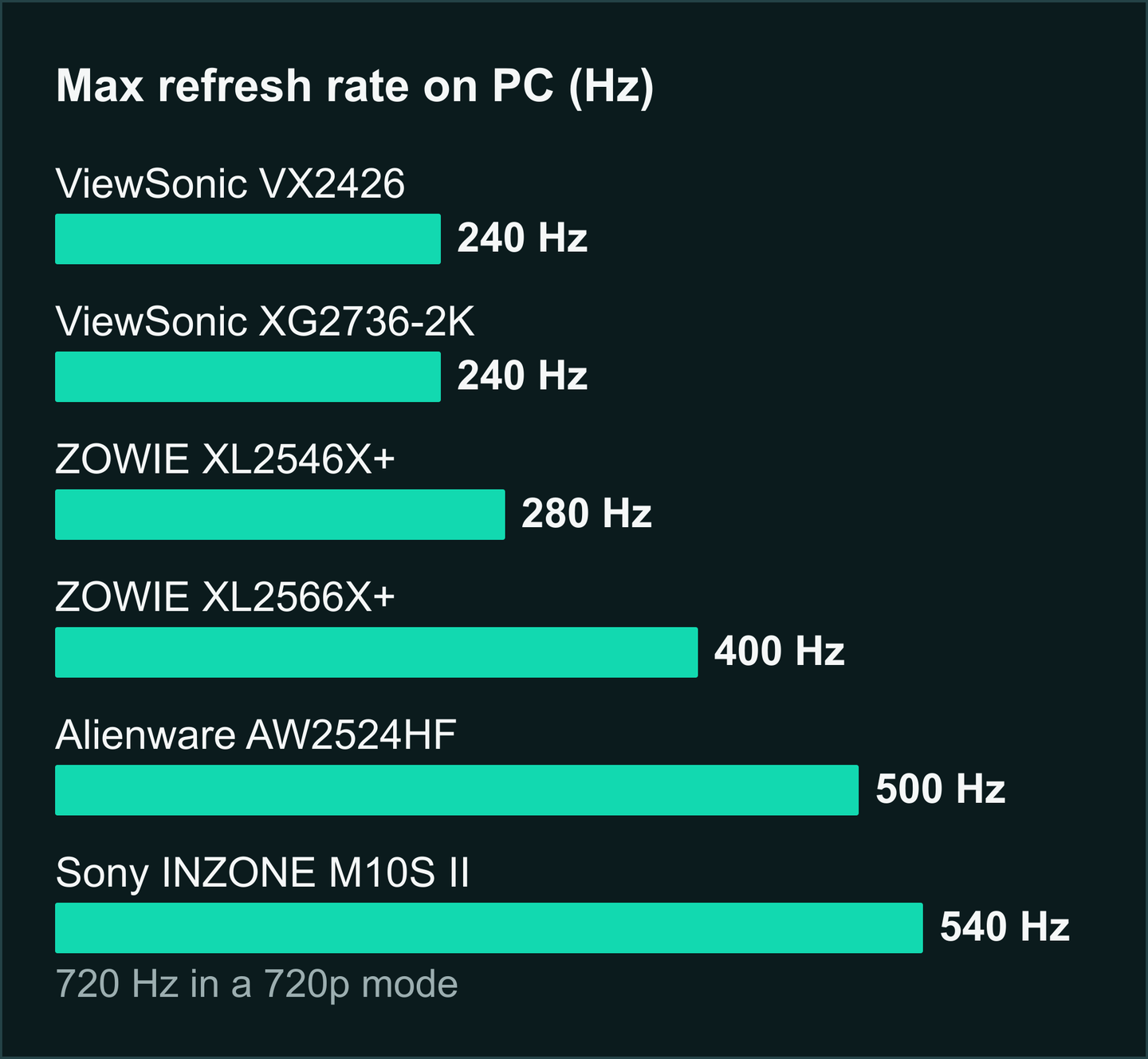
| Sony INZONE M10S II | OLED | 27 inch, 2560 x 1440 | 540 Hz (720 Hz in a 720p mode) | 0.02 ms GtG | Check price on Sony(affiliate link, opens in a new tab) |
ViewSonic VX2426
Who it's for: Players stepping up from a slower 1080p screen.
ViewSonic XG2736-2K
Who it's for: Mid-range buyers who want one screen for shooters and everything else.
ZOWIE XL2546X+
Who it's for: ZOWIE fans who want DyAc 2 in the mid-range.
ZOWIE XL2566X+
Who it's for: Valorant and CS2 regulars who want the fastest ZOWIE pick here.
Alienware 500Hz Gaming Monitor (AW2524HF)
Who it's for: IPS buyers who want more speed than the ViewSonic pair.
Sony INZONE M10S II
Who it's for: OLED fans who prefer 1440p.
Six things that decide the best gaming monitor for FPS
Start with refresh rate, then choose the panel: together they set the speed and clarity of what you see.
Response time, size, sync and the cable come after.
What refresh rate do you need for FPS?
Refresh rate, counted in hertz (Hz), is how many times a second the monitor redraws the image.
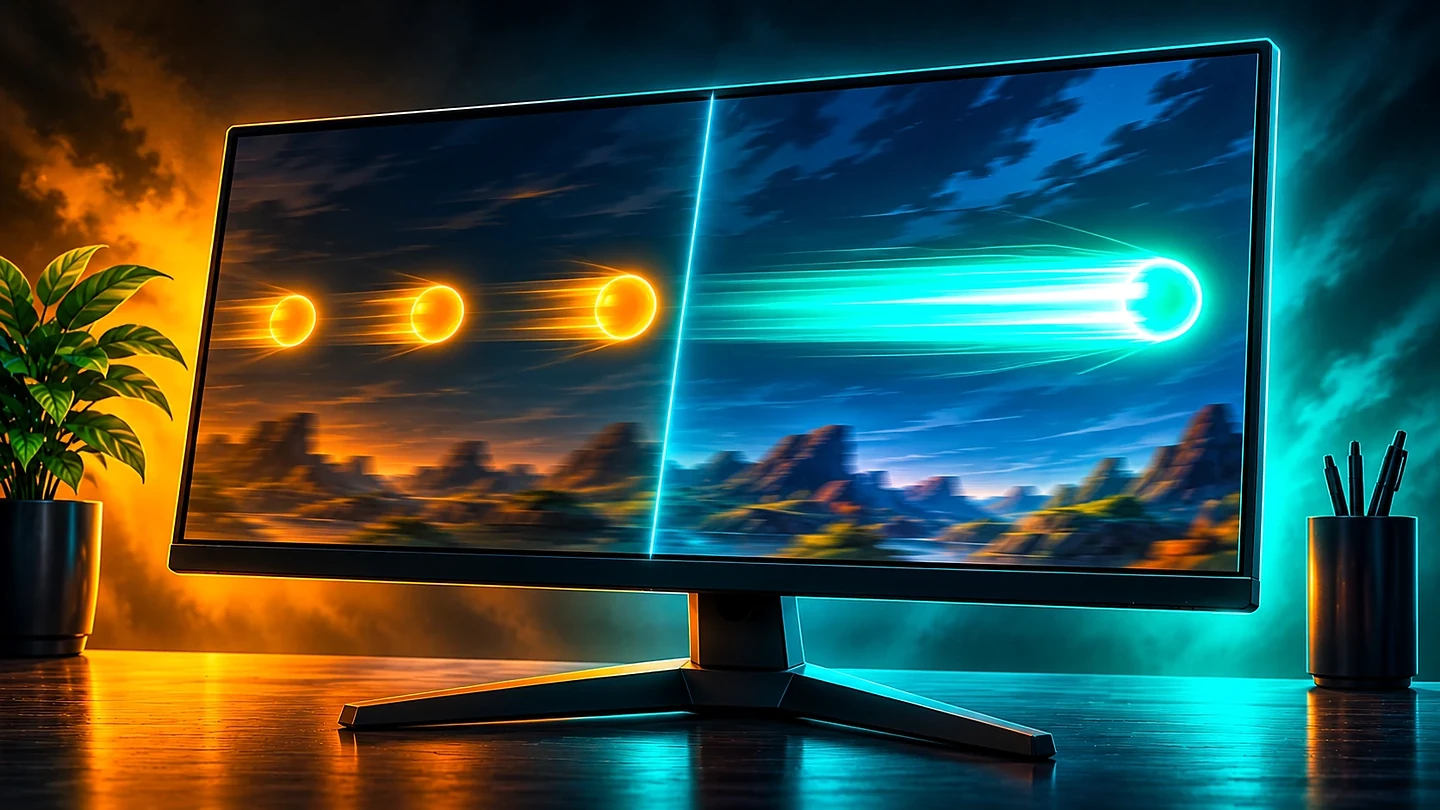
A higher rate shows extra steps of an enemy's strafe, as long as your PC renders a new frame for each redraw.
Say CS2 runs at 280 fps on your PC. The XL2546X+ at 280 Hz shows all of them.
At 400 Hz, the XL2566X+ still gets the same 280 new frames a second.
Is TN, IPS or OLED better for FPS?
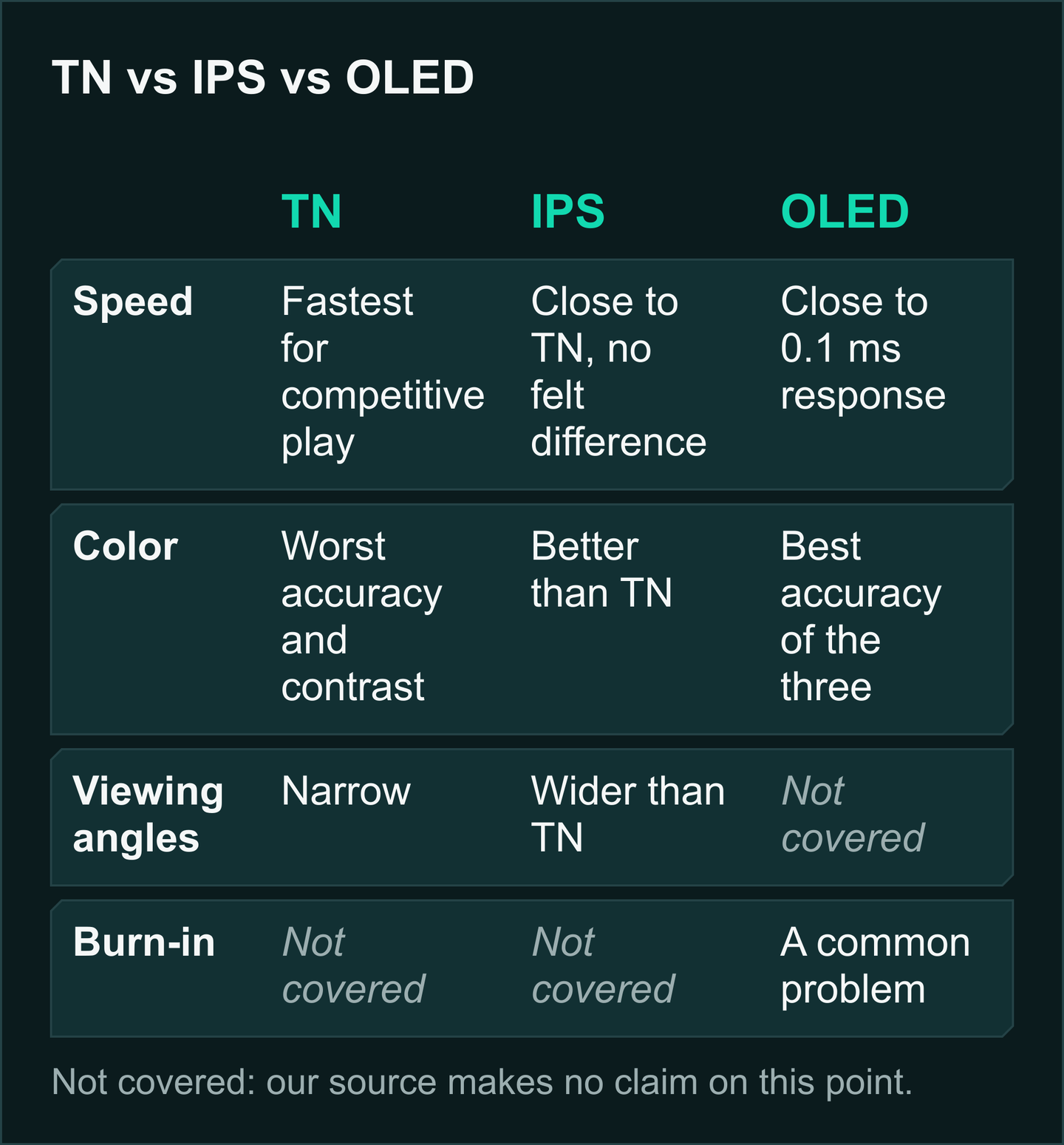
ProSettings.net calls TN the fastest panel for pure competitive play.
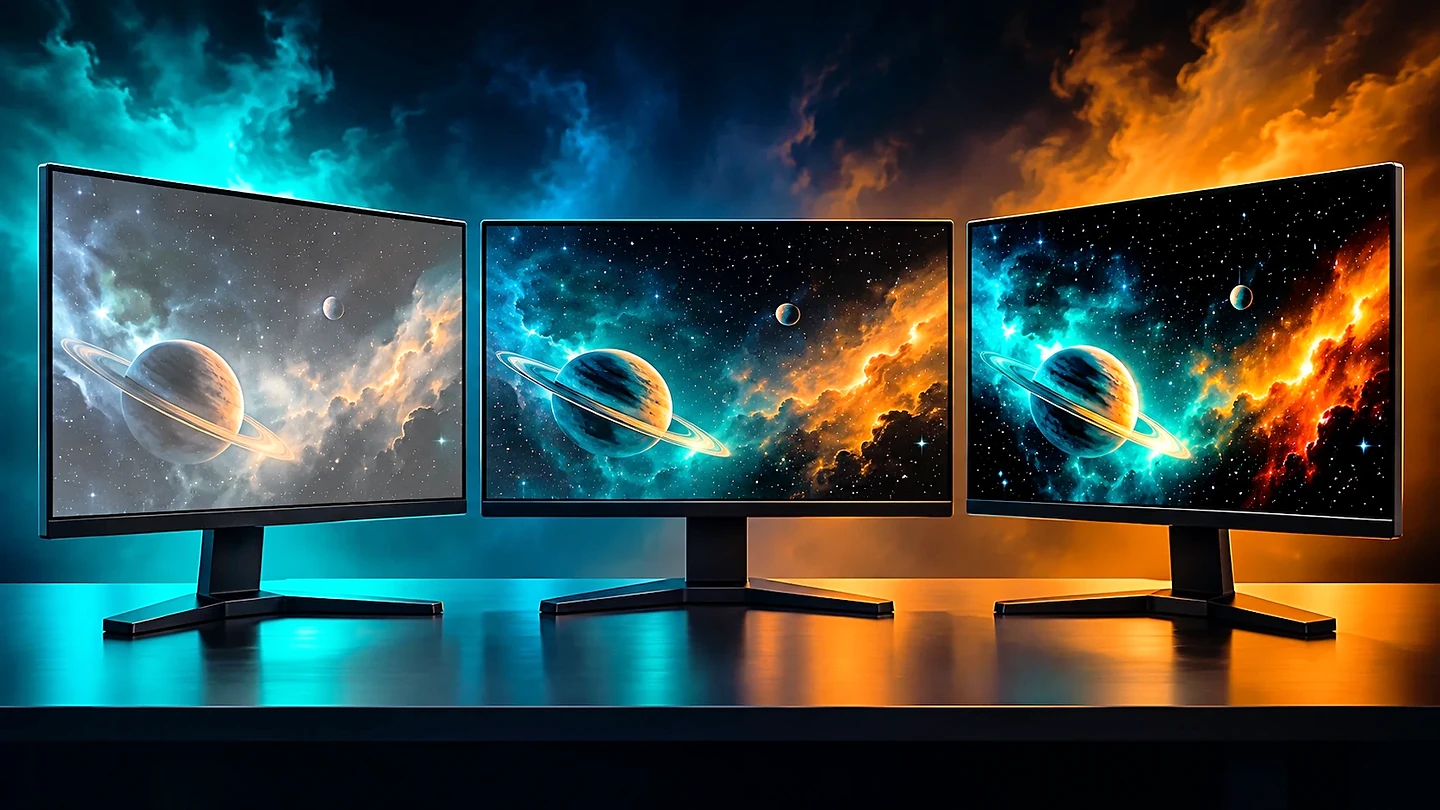
All of the top five monitors in its August 2026 data are TN.
The trade, per ProSettings.net: the worst color accuracy and contrast, with narrow viewing angles.
IPS, on the ViewSonic and Alienware monitors, is close enough on response not to feel different, per ProSettings.net.
Its known flaw is IPS glow, a faint white glow in the screen corners.
OLED responds in close to 0.1 ms in ProSettings.net's figures and has the best color accuracy of the three.
Sony quotes a GtG figure below 0.1 ms for the M10S II.
If ranked shooters fill your week, take TN. If other games matter to you too, consider IPS or OLED.
Which response time spec should you compare?
Response time comes in two kinds that do not compare: GtG and MPRT. Compare monitors only on the same kind.
Per BenQ, GtG (gray-to-gray) is how long a pixel takes to change shade.
How long the pixel stays visible is MPRT (moving picture response time), in BenQ's terms.
ViewSonic quotes both for its two models, Dell gives GtG for the AW2524HF, and BenQ publishes none for its ZOWIE line.
On a moving target, a lower MPRT means less smear.
24-inch 1080p or 27-inch 1440p for FPS?
Most pros on ProSettings.net sit at 1080p (1920 x 1080) on 24 to 24.5-inch sizes.
The five leaders on its pro list are all ZOWIE.
Together they cover 56.38% of the pro players tracked by ProSettings.net (as of October 2026).
What pros pick will not fit every player, though.
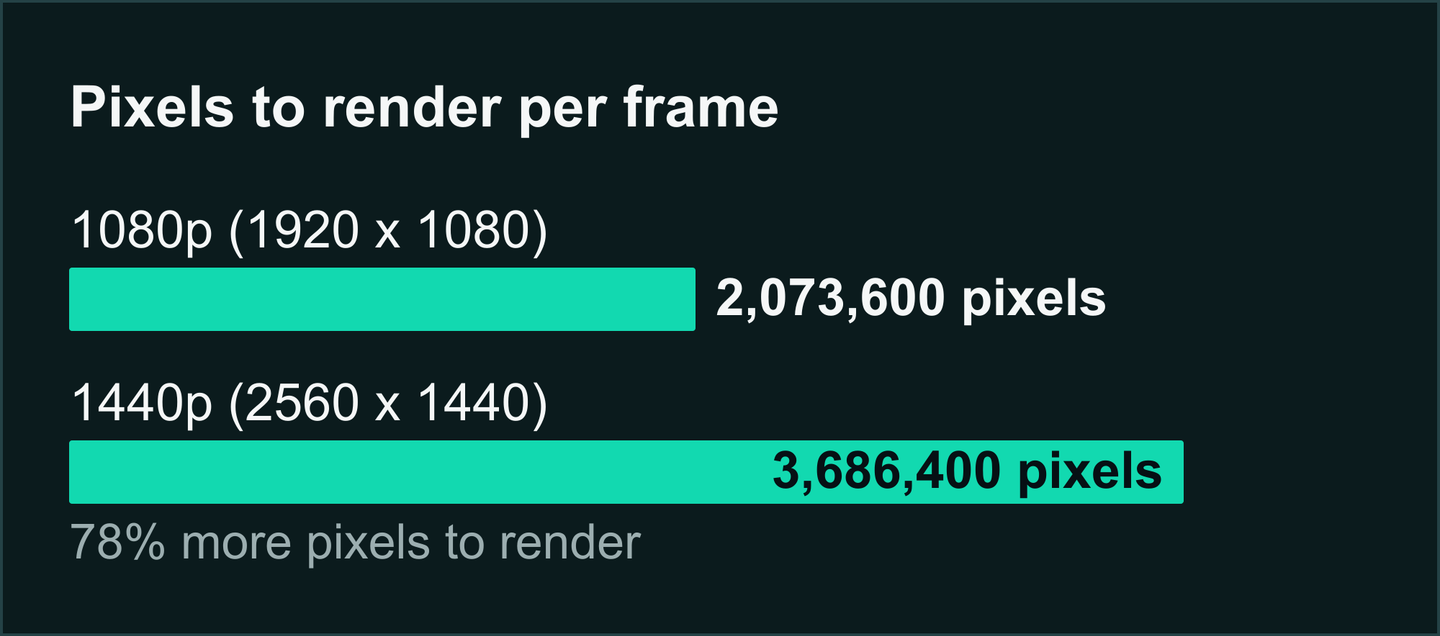
A 27-inch 1440p monitor is sharper, but each frame has 78% more pixels to render.
The M10S II also has a tournament mode that shrinks the picture for anyone used to smaller screens.
Do you need G-Sync, FreeSync or blur reduction?
Variable refresh rate (VRR) matches the refresh rate to your graphics card's frame rate on the fly, as ViewSonic's explainer describes adaptive sync.
FreeSync is AMD's version and G-Sync NVIDIA's.
The AW2524HF and VX2426 support FreeSync Premium, and the XG2736-2K is G-Sync Compatible.
On the ZOWIE monitors you get VRR or DyAc 2, not both: BenQ allows VRR only with DyAc 2 off.
In a match, that means choosing between tear-free motion and BenQ's blur reduction.
HDMI or DisplayPort: which gets the full refresh rate?
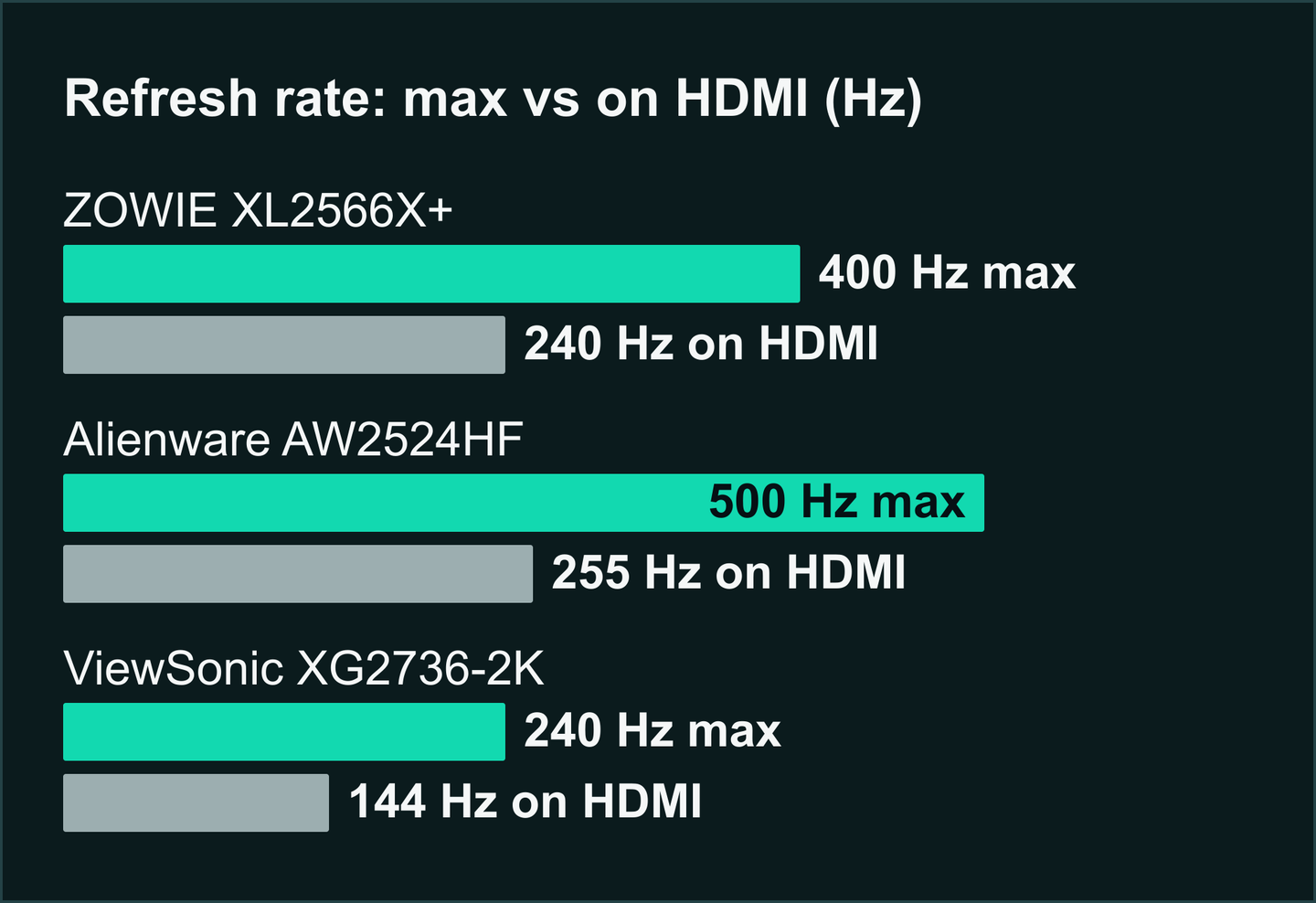
On HDMI, three of these monitors drop their refresh rate: the XL2566X+ to 240 Hz, the AW2524HF to 255 Hz and the XG2736-2K to 144 Hz.
The VX2426 is the exception in the ViewSonic pair: ViewSonic lists its full refresh rate on HDMI 2.1 too.
Common mistakes
Monitor mistakes usually come from buying one spec and ignoring what it needs or costs.
- A faster monitor than your PC can feed. Look at your frame rate in Valorant or CS2 first: hertz above it add no new frames.
- HDMI instead of DisplayPort. HDMI can cap the refresh rate, so connect with DisplayPort.
- 1440p on a graphics card that cannot hold your frame rate there. The sharper image means many extra pixels per frame, so pick a 1080p model instead if your card already struggles at your usual frame rate.
- OLED without accepting burn-in. ProSettings.net calls burn-in a common problem in OLED monitors, so buy one if you can live with that risk.
Who each budget tier suits
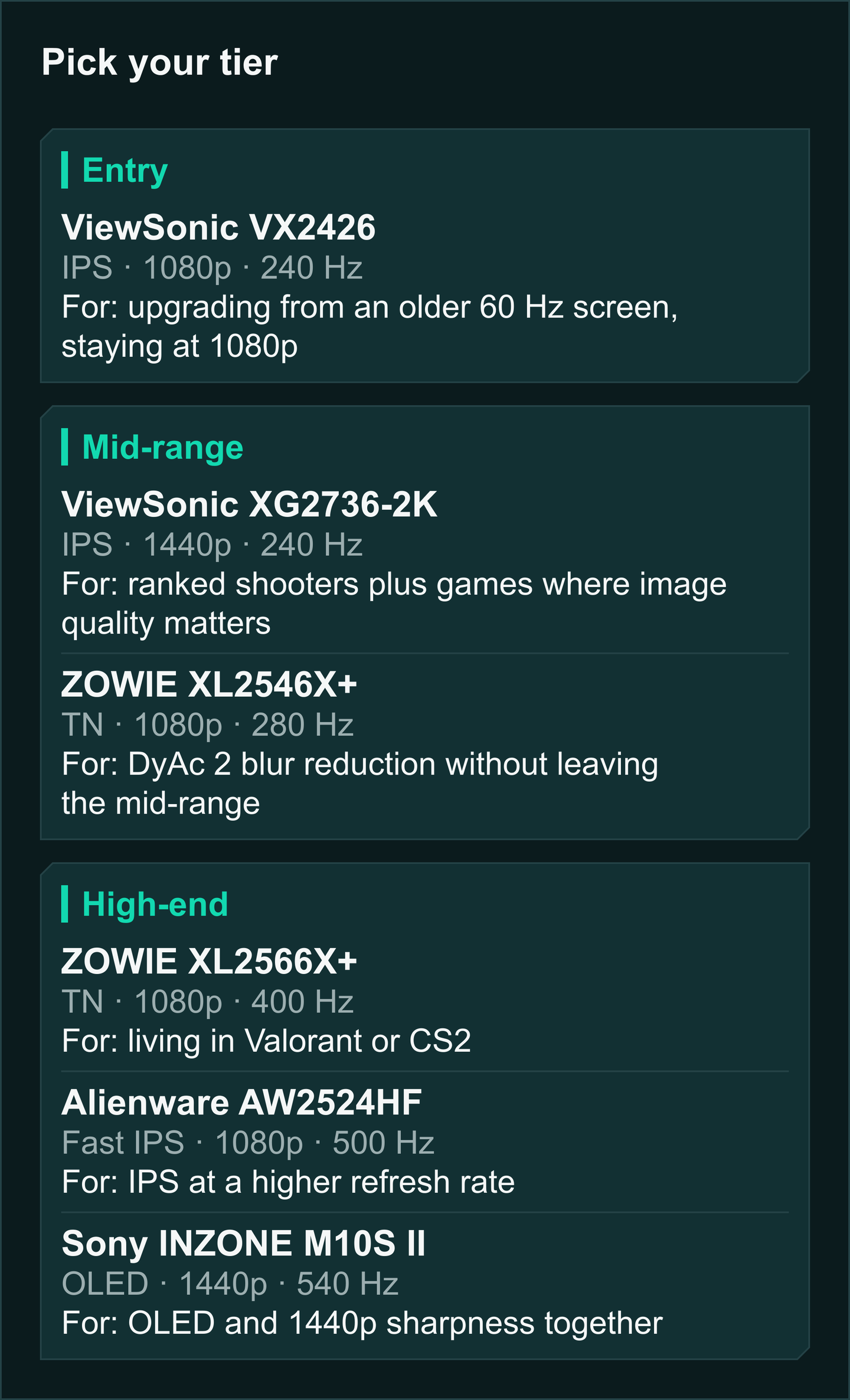
Match the tier to your habits: entry for a first fast monitor, mid-range for the bulk of competitive players, high-end for shooter-only or OLED buyers.
- Entry: the ViewSonic VX2426, if you are upgrading from an older 60 Hz screen and stick to 1080p.
- Mid-range: the ViewSonic XG2736-2K, if you split your time between ranked shooters and games where image quality matters. The ZOWIE XL2546X+ suits you better if you want BenQ's DyAc 2 blur reduction without leaving the mid-range.
- High-end: the ZOWIE XL2566X+ for anyone who lives in Valorant or CS2, the Alienware AW2524HF if you prefer IPS at a higher refresh rate, or the Sony INZONE M10S II if OLED and 1440p sharpness together appeal.
Our take: buy the XG2736-2K, and step up to the XL2566X+ if you never launch anything but shooters.
Skip the ViewSonic pair if you count on blur reduction, since ViewSonic lists none.
Pass on the AW2524HF if you want more detail than 1080p.
Every monitor we cover sits in the gaming monitors section.
Frequently asked questions
Should I get 1080p at 240 Hz or 1440p at 240 Hz?
ProSettings.net's pro list is led by 1080p models, and 1080p has 44% fewer pixels to render per frame than 1440p. Pick 1440p if finer detail matters more to you than that lighter load.
Which panel type leads among pros?
TN. ProSettings.net calls it the fastest for pure competitive gameplay, IPS comes close on response, and OLED leads on color accuracy.
Is the ViewSonic VX2426 quick enough for esports titles?
Yes, on paper: both response figures ViewSonic lists for it sit under the 4 ms that BenQ's response time explainer advises for gaming.
Will a high refresh rate monitor help if my frame rate is lower?
Only up to the frame rate your PC actually delivers. A monitor cannot show more new frames than your game renders.
Sources
- ZOWIE XL2566X+ specifications, BenQ ZOWIE US, official product page (undated, read October 25, 2026)
- ZOWIE XL2546X+ specifications, BenQ ZOWIE US, official product page (undated, read October 25, 2026)
- ZOWIE monitor lineup, BenQ ZOWIE US, official listing (undated, read October 25, 2026)
- ViewSonic VX2426, ViewSonic US, official product page (undated, read October 25, 2026)
- ViewSonic XG2736-2K, ViewSonic US, official product page (undated, read October 25, 2026)
- Alienware 500Hz Gaming Monitor (AW2524HF), Dell US, official product page (undated, read October 25, 2026)
- INZONE M10S II (SDM-27Q102/B), Sony Electronics US, official product page (undated, read October 22, 2026)
- Sony Electronics Expands Gaming Gear Lineup with INZONE H6 Air and INZONE M10S II, Sony Electronics, official press release (April 14, 2026)
- Monitors used by pro players, ProSettings.net, pro usage list (undated, read October 25, 2026)
- TN vs IPS vs OLED for gaming, ProSettings.net, panel comparison (August 10, 2026)
- Gaming monitor response time: GtG vs MPRT, BenQ, knowledge center explainer (August 21, 2020)
- What is Adaptive Sync?, ViewSonic Library, explainer (October 30, 2025)