
Quick answer
Top pick
Pick the Logitech G Pro X Superlight 2 for wireless, or the wired Razer DeathAdder V3 if you want no battery to think about. We chose them for weight, and the Superlight 2 also for runtime and pro use, not for latency: the only lab data we could open covers older mice, where wireless trailed wired mode by 0.2 to 4 ms and the mouse mattered more than the connection.
- Pick the Logitech G Pro X Superlight 2 if you want wireless and the mouse used by 11.88% of tracked pros (ProSettings.net, November 2026).
- Pick the Razer DeathAdder V4 Pro if you want the longest listed battery here, up to 150 hours.
- Pick the Razer DeathAdder V3 if you want a wired mouse with nothing to charge.
Our picks are based on manufacturer specs, independent lab measurements (Igor'sLAB) and pro player usage data. We have not tested these products hands-on.
At a glance
Logitech G Pro X Superlight 2
- Verdict
- Swipes with nothing pulling on the mouse, and a USB cord in the box when you want one.
- Who it is for
- Players who want wireless and a wired fallback.
Key specs
- Connection
- Wireless dongle, USB cable in the box
- Weight
- 60 g
- Playtime
- Up to 95 hours
In this article
Part of: Best Gaming Mice for FPS
Your click is only as fast as the path from the button to the screen, and wireless puts one more link in that path. Whether it adds delay depends on the mouse: Igor'sLAB's database puts wired and wireless mice in its fastest group, and some wired ones far behind. Below: what its tests found, what wireless costs, the comparisons that mislead, and who each side suits.
Our picks compared
Comparison based on published specifications. Check the manufacturer page for current details.
Compare all specs
| Product | Connection | Weight | Battery life | Link |
|---|---|---|---|---|
| Razer DeathAdder V3 | Wired (SpeedFlex cable) | 59 g | None (wired) | Check price on Razer(affiliate link, opens in a new tab) |
| Logitech G Pro X Superlight 2 | Wireless dongle, USB cable in the box | 60 g | Up to 95 hours | Check price on Logitech G(affiliate link, opens in a new tab) |
| Razer DeathAdder V4 Pro | Wireless, plus a wired mode | 56 g | Up to 150 hours | Check price on Razer(affiliate link, opens in a new tab) |
Razer DeathAdder V3
Who it's for: Nothing to charge or watch, for players happy with a cable.
Logitech G Pro X Superlight 2
Who it's for: A cable-free swipe, with a USB cord in the box as a fallback.
Razer DeathAdder V4 Pro
Who it's for: The longest time between charges here, up to 150 hours.
How much later does a wireless click land?
In those tests, wireless trailed the same mouse's wired mode by 4 ms or less. It timed each click until the first changed pixel on screen, on 22 older mice, nearly all reporting to the PC 1,000 times a second, with a 240 Hz monitor. Wireless trailed wired mode by:
- 0.2 ms on the Logitech G303 Shroud
- 2.5 to 3.4 ms on Logitech's ProX Superlight and the ASUS ROG Chakram X
- 4 ms on the BenQ ZOWIE U2
- almost nothing on the G903 LIGHTSPEED and the ROG Harpe ACE Aim Lab
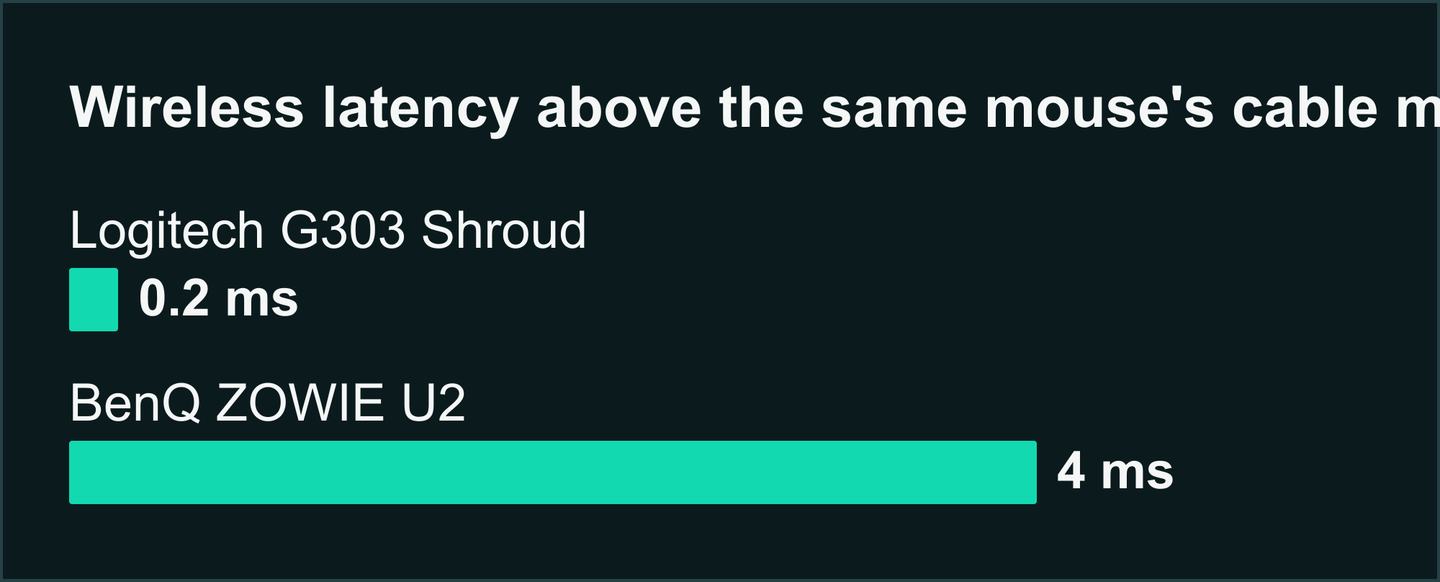
A 240 Hz screen refreshes every 4.17 ms (our arithmetic: 1,000 divided by 240), so the widest of those is about one refresh.
The lab left Bluetooth out because of its higher latency. For FPS, use the 2.4 GHz dongle, the small USB receiver in the box.
Why do latency figures disagree?
The figures disagree because they time different stretches. Razer's page claims 0.291 ms for its wireless link and 0.090 ms wired, counted from the click to the frame arriving at the PC. Igor'sLAB counts to the screen, where its fastest mice land at 9 to 14 ms.
Side by side, the two sets of numbers make wireless look free of cost. They are not the same test, and a maker's claim is not a measurement. Settings matter too: the lab warns that latency can quickly double if the "fast mode" is not kept permanently enabled.
We found no measured latency we could open for the three mice we chose.
Is a wireless mouse heavier, and how long does its battery last?
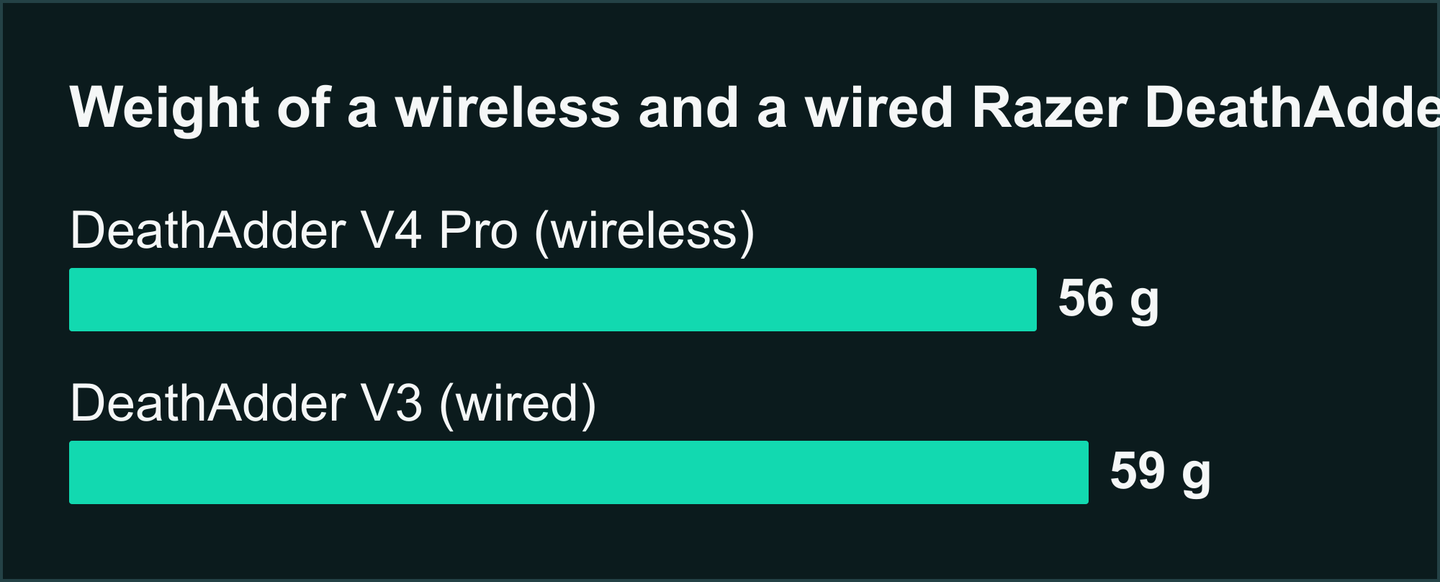
Not necessarily: the wireless DeathAdder V4 Pro weighs 56 g and the wired DeathAdder V3 59 g. ProSettings.net's list still shows some wireless mice at 77 to 81 g (ZOWIE EC2-CW, G Pro Wireless), so check the exact mouse.
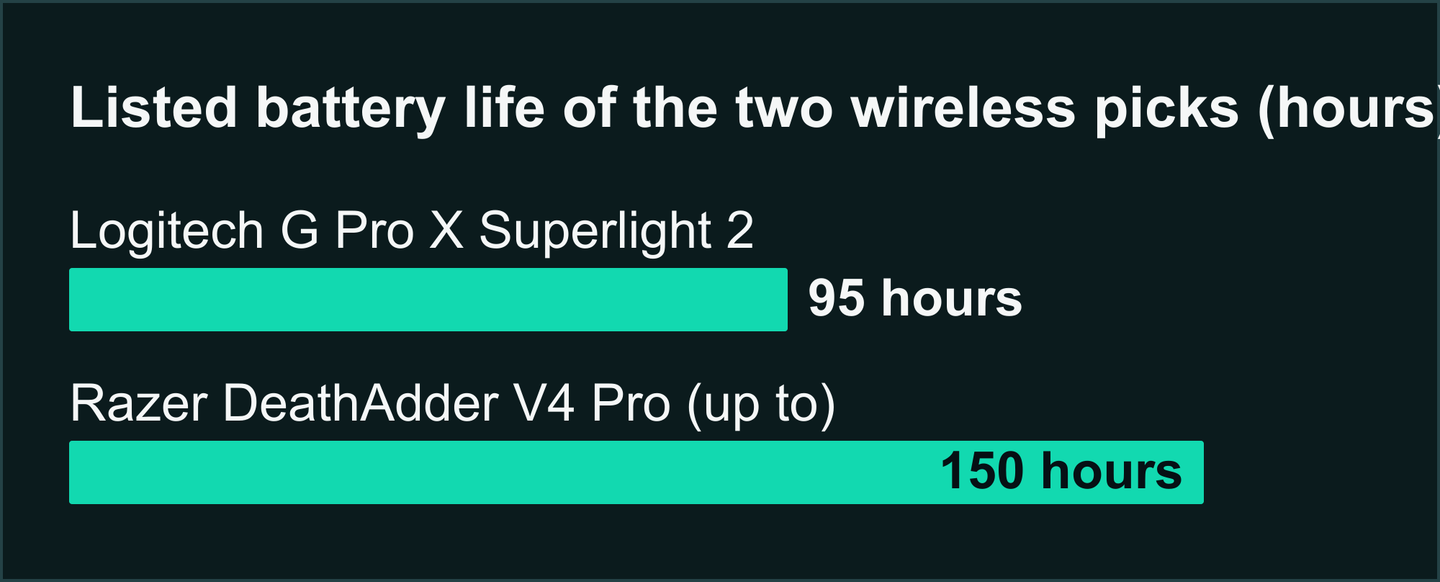
The Superlight 2 runs 95 hours and the V4 Pro up to 150 hours with the latest firmware (the mouse's built-in software). Treat both as best cases.
The full pick list, with weights and pro shares, is in our guide to gaming mice for FPS.
Are tracked pros still on wired mice?
Very few are: the top 24 mice on ProSettings.net's list of 2,458 tracked pros are all wireless, led by the Superlight 2 at 11.88% and with the DeathAdder V4 Pro at 6.51% (November 2026). The wired DeathAdder V3 has 1 of the 2,458. Pro choices do not always fit every player, so weigh them against how you play.
Should you buy a wired or a wireless gaming mouse for FPS?
Go wireless if you will keep it charged and want no cord tugging at the mouse. Stay wired if you want no battery to watch. The 0.2 to 4 ms gaps were measured on older mice, not on these three.
Wired or wireless?
Choose Wired if…
- You want a mouse with nothing inside to run down, like the DeathAdder V3.
- You would rather not check a level before a ranked match.
- You accept a cord at the end of every swipe.
Choose Wireless if…
- You accept up to 4 ms, the widest gap found and under one 240 Hz refresh, for a cable-free swipe.
- 95 hours (Superlight 2) or up to 150 (V4 Pro) between charges suits your week.
- You want to match the wireless mice that fill ProSettings.net's top 24.
That data gives no reason to avoid wireless on latency alone. It gives a reason to check the exact mouse, since one test found 0.2 ms on one and 4 ms on another. For our three mice, runtime, grams and pro use decide.
Frequently asked questions
Is a wireless gaming mouse slower than a wired one for FPS?
Slightly, on some mice. Igor'sLAB found wireless 0.2 ms behind wired mode on one older mouse and 4 ms behind on another, none of them our picks. One 240 Hz refresh lasts 4.17 ms.
Is Bluetooth good enough for competitive FPS?
Igor'sLAB left Bluetooth out of its latency tests because of its higher latency. For FPS, use the mouse's own 2.4 GHz dongle, the small USB receiver in the box.
How long does a wireless gaming mouse battery last?
Up to 95 hours for the Logitech G Pro X Superlight 2 and up to 150 hours for the Razer DeathAdder V4 Pro with the latest firmware. Treat both as best cases.
Do pro players use wireless mice?
Yes. Every one of the top 24 mice on ProSettings.net's list of 2,458 tracked pros (November 2026) is wireless.
Can a wireless mouse's power-saving mode add latency?
It can. Igor'sLAB says latency can quickly double if the "fast mode" is not kept permanently enabled, so check the mouse's modes in its software.
Sources
- Latency measurements in the test: many with and without cable, igor'sLAB, lab test with NVIDIA LDAT V2 (published May 6, 2025)
- Die Messergebnisse (results page, German), igor'sLAB, wired and wireless differences per mouse (published May 6, 2025)
- Zusammenfassung und Fazit (conclusion page, German), igor'sLAB, fastest group of 9 to 14 ms (published May 6, 2025)
- Database and charts for the latencies of input devices, igor'sLAB, mouse ranking and the "fast mode" warning (published May 6, 2025, last modified June 17, 2026)
- Razer HyperPolling, Razer, manufacturer click-to-PC latency figures: 0.291 ms wireless, 0.090 ms wired (undated, read November 22, 2026)
- Razer DeathAdder V3, Razer US, official product page: wired, 59 g (undated, read November 22, 2026)
- Razer DeathAdder V4 Pro, Razer US, official product page: 56 g, up to 150 hours with the latest firmware, wired and wireless modes (undated, read November 22, 2026)
- G PRO X Superlight 2, Logitech G US, official product page: 60 g (undated, read November 22, 2026)
- Specification: G PRO X Superlight 2, Logitech support US, spec sheet: 95 hours, USB-A to USB-C charging and data cable (undated, read November 22, 2026)
- Mice used by pro players, ProSettings.net, pro usage list: top 24 all wireless, Superlight 2 first at 11.88% (292 of 2,458), V4 Pro 6.51% (160), re-read November 22, 2026 (undated)