Best Gaming Monitors for PS5
4 picks144–240 Hz
Four gaming monitors matched to what Sony names for the PS5 (HDMI 2.1, 4K at 120 Hz, VRR, 1440p), picked from official US specs.
Quick answer
Top pick
Take the Alienware AW3225QF if you play on 4K and want OLED, or the ViewSonic XG2736-2K if you stay on 1440p. Both have the HDMI 2.1 inputs a PS5 needs for 120 Hz and VRR.
- Pick the Alienware AW3225QF if you play on 4K and prefer OLED, with two HDMI 2.1 inputs.
- Pick the ASUS TUF Gaming VG28UQL1A if you need 4K with HDMI 2.1 (FRL) and no OLED.
- Pick the ViewSonic XG2736-2K if you play at 1440p with two HDMI 2.1 inputs.
- Pick the Sony PlayStation 27-inch Gaming Monitor if you play at 1440p and want up to 120 Hz with VRR, per Sony.
Our picks are based on manufacturer specs and Sony's official PlayStation pages. We have not tested these products hands-on.
At a glance
Alienware AW3225QF
- Verdict
- Rich 4K OLED images on a PS5, from two HDMI 2.1 inputs, each rated at 4K 240 Hz with HDR and VRR.
- Who it is for
- PS5 owners who play on 4K and prefer OLED.
Key specs
- Size and resolution
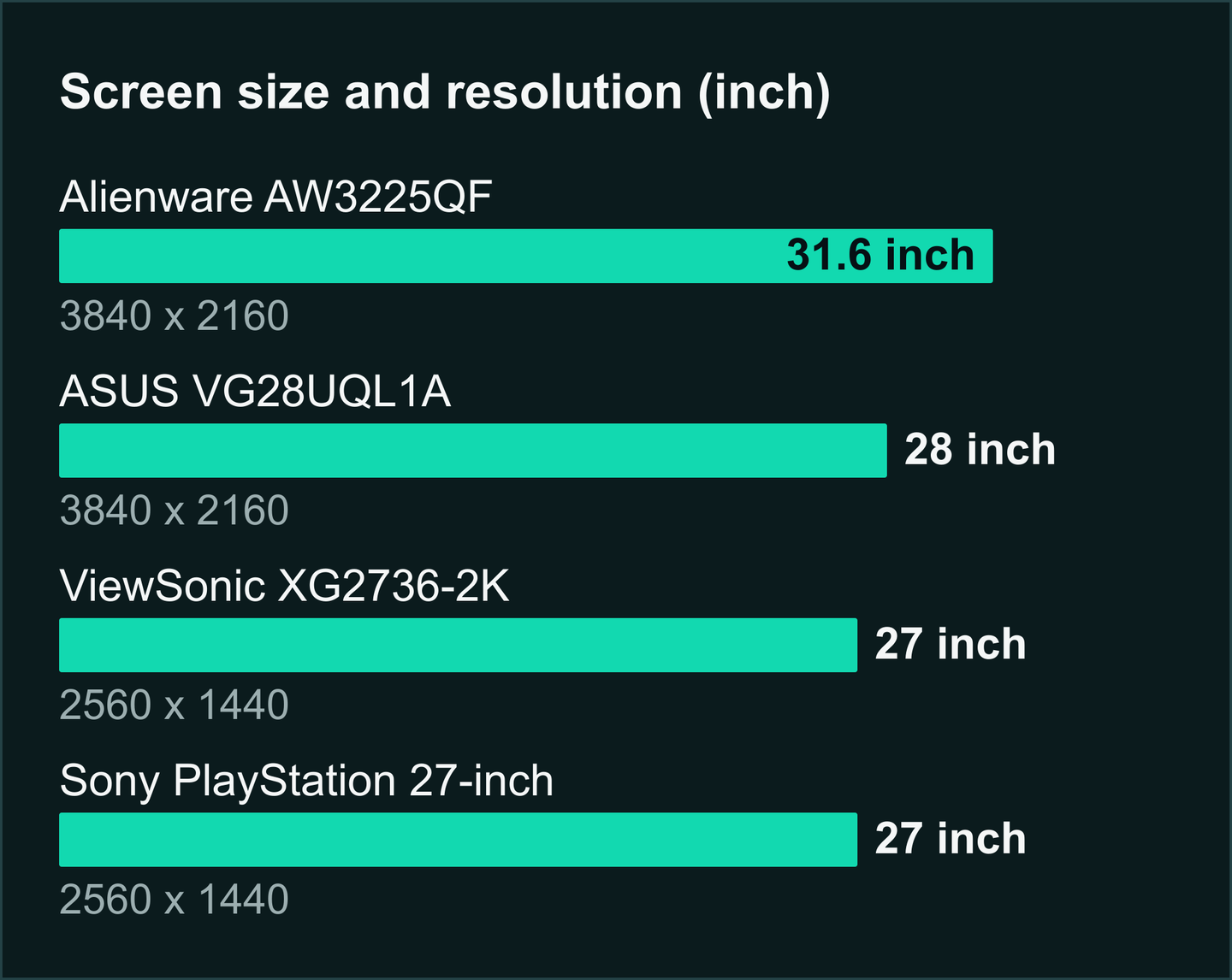
- 31.6 inch viewable, 3840 x 2160
- Panel
- QD-OLED, curved 1700R
- HDMI inputs
- 2 x HDMI 2.1, 4K 240 Hz with VRR
- Burn-in cover
- 3-year exchange
In this article
Part of: Best Gaming Monitors for FPS
The PS5 supports HDMI 2.1 and 4K 120 Hz output, says Sony's support page; 1440p runs at 60 or 120 Hz, and VRR needs an HDMI 2.1 display. Sony's own monitor shows the split: 240 Hz on PC, up to 120 Hz on a PS5. We matched four monitors to those conditions from official US pages, checked on November 20, 2026. PC players should start with our guide to FPS monitors.
Our picks compared
Comparison based on published specifications. Check the manufacturer page for current details.
Compare all specs
| Product | Size and resolution | Max refresh rate | HDMI inputs | Variable refresh | Link |
|---|---|---|---|---|---|
| Alienware AW3225QF | 31.6 inch viewable, 3840 x 2160, curved | 240 Hz | 2 x HDMI 2.1 (4K 240 Hz with VRR, per Dell) | G-SYNC Compatible, VESA Adaptive Sync | Check price on Dell(affiliate link, opens in a new tab) |
| ASUS TUF Gaming VG28UQL1A | 28 inch, 3840 x 2160 | 144 Hz | 2 x HDMI 2.1 (FRL), 2 x HDMI 2.0 | Adaptive-Sync, G-SYNC Compatible, FreeSync Premium | Check price on ASUS(affiliate link, opens in a new tab) |
| ViewSonic XG2736-2K | 27 inch, 2560 x 1440 | 240 Hz (144 Hz on HDMI 2.1) | 2 x HDMI 2.1 (48-144 Hz) | G-Sync Compatible, FreeSync Premium | Check price on ViewSonic(affiliate link, opens in a new tab) |
| Sony PlayStation 27-inch Gaming Monitor | 27 inch, 2560 x 1440 | 240 Hz on PC (up to 120 Hz on PS5, per Sony) | 2 x HDMI 2.1 | HDMI VRR, AMD FreeSync Premium | Check price on PlayStation(affiliate link, opens in a new tab) |
Alienware AW3225QF
Who it's for: Rich 4K OLED images, for PS5 owners who play on 4K.
ASUS TUF Gaming VG28UQL1A
Who it's for: 4K over HDMI 2.1, for players who skip OLED.
ViewSonic XG2736-2K
Who it's for: Sharp 1440p over HDMI 2.1, for players who stay on 1440p.
Sony PlayStation 27-inch Gaming Monitor
Who it's for: Sony's own word on PS5 support, for players who stay on 1440p.
What resolutions and refresh rates does a PS5 output?
The PS5 outputs 4K at 120 Hz, 1440p at 60 or 120 Hz and VRR, each with a condition.
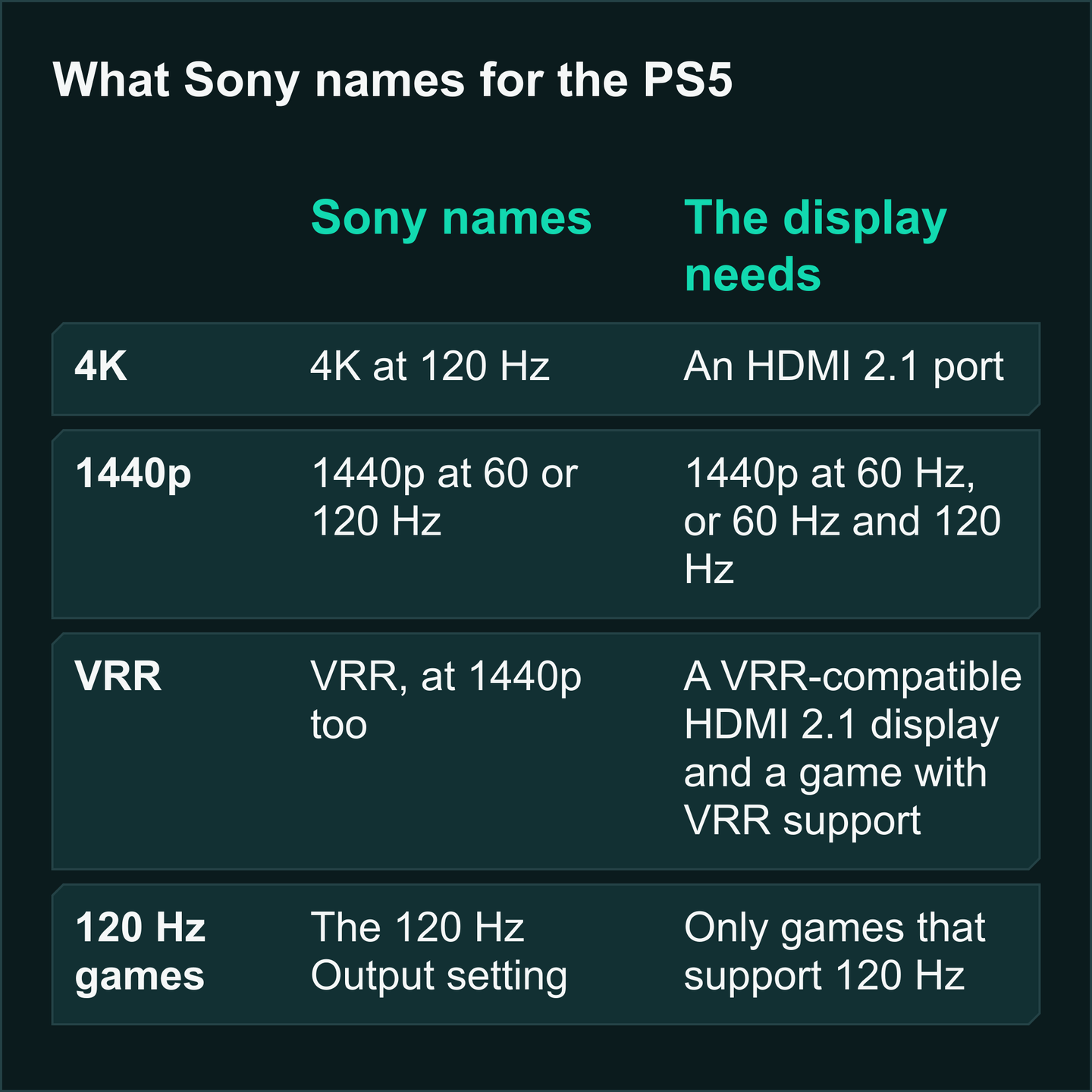
- 4K at 120 Hz: connect to an HDMI 2.1 port. The checklist is written for TVs.
- 1440p: the display must support 1440p at 60 Hz, or 60 Hz and 120 Hz. The note names no HDMI version.
- VRR: a VRR-compatible HDMI 2.1 display, at 1440p too, and a game with VRR support.
- 120 Hz games: the 120 Hz Output setting only applies to games that support 120 Hz.
How do the best gaming monitors for a PS5 compare?
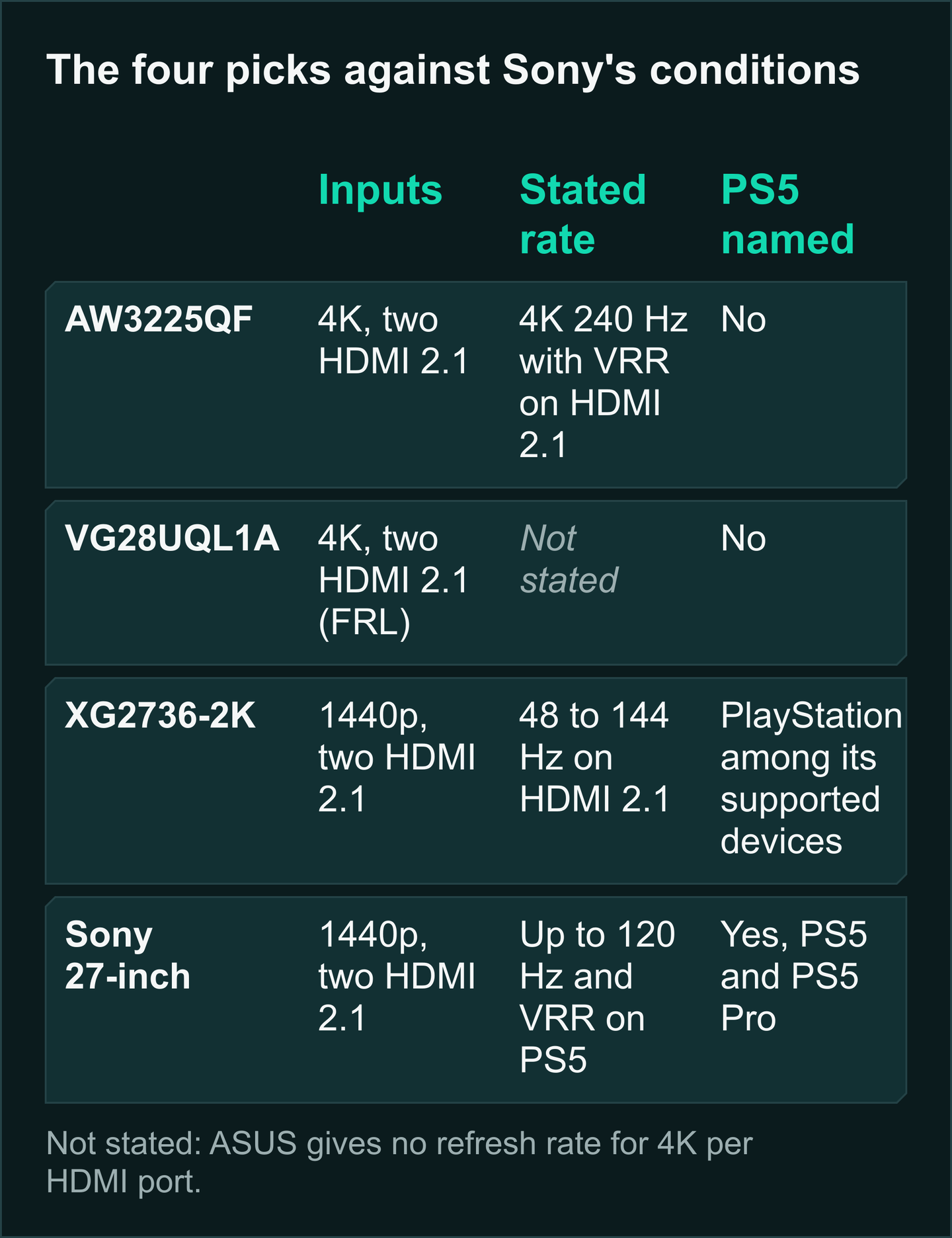
Four fit on paper: two for 4K, two for 1440p. All four also run on a PC. Neither Dell nor ASUS mentions PS5, so their match rests on the HDMI 2.1 ports and the PS5 checklist.
- Alienware AW3225QF: two HDMI 2.1 inputs rated 4K 240 Hz with VRR, and a 3-year exchange that covers burn-in. Look elsewhere if you need a flat screen.
- ASUS TUF Gaming VG28UQL1A: 4K with two HDMI 2.1 (FRL) inputs. Skip it if you prefer OLED.
- ViewSonic XG2736-2K: 1440p, two HDMI 2.1 inputs at 48 to 144 Hz, and PlayStation among its supported devices. ViewSonic's page showed it "In stock". Not worth it if you need 4K.
- Sony PlayStation 27-inch Gaming Monitor: 1440p, two HDMI 2.1 inputs, up to 120 Hz and VRR on PS5. PlayStation Direct US showed "Currently Unavailable". Skip it until that changes.
Why doesn't a 240 Hz spec hold on a PS5?
A spec sheet leads with its top refresh rate, which may not be available on the port you plug the PS5 into.
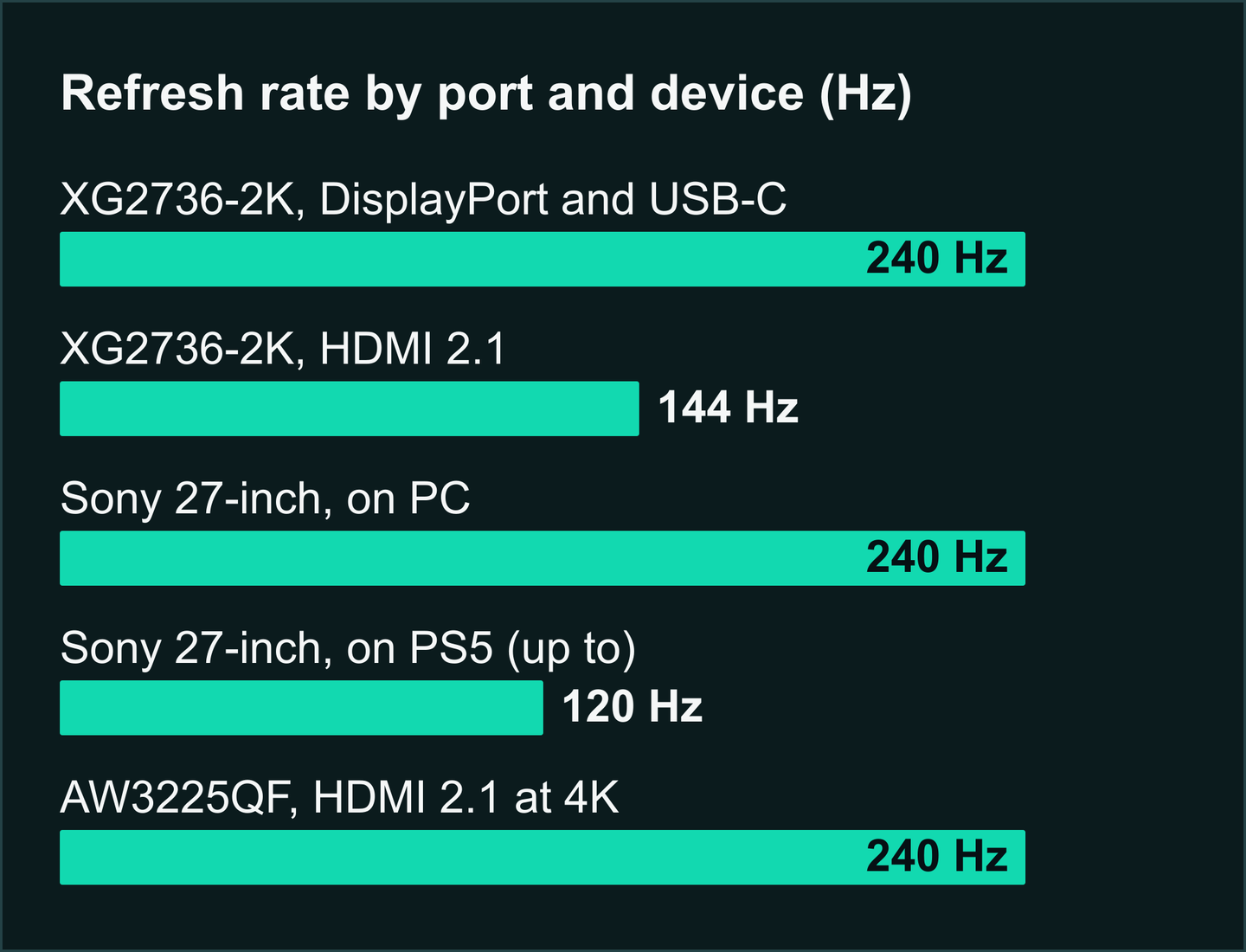
- Taking a PC refresh rate for a PS5 rate. Even the 240 Hz PlayStation monitor runs at up to 120 Hz on a PS5.
- Skipping the HDMI version. The 4K 120 Hz checklist names an HDMI 2.1 port.
- Expecting 120 Hz in every game. The 120 Hz setting covers only games that support it.
Is a 1440p or a 4K monitor better for a PS5?
The PS5 outputs both 1440p and 4K, so choose the resolution whose conditions your setup meets.
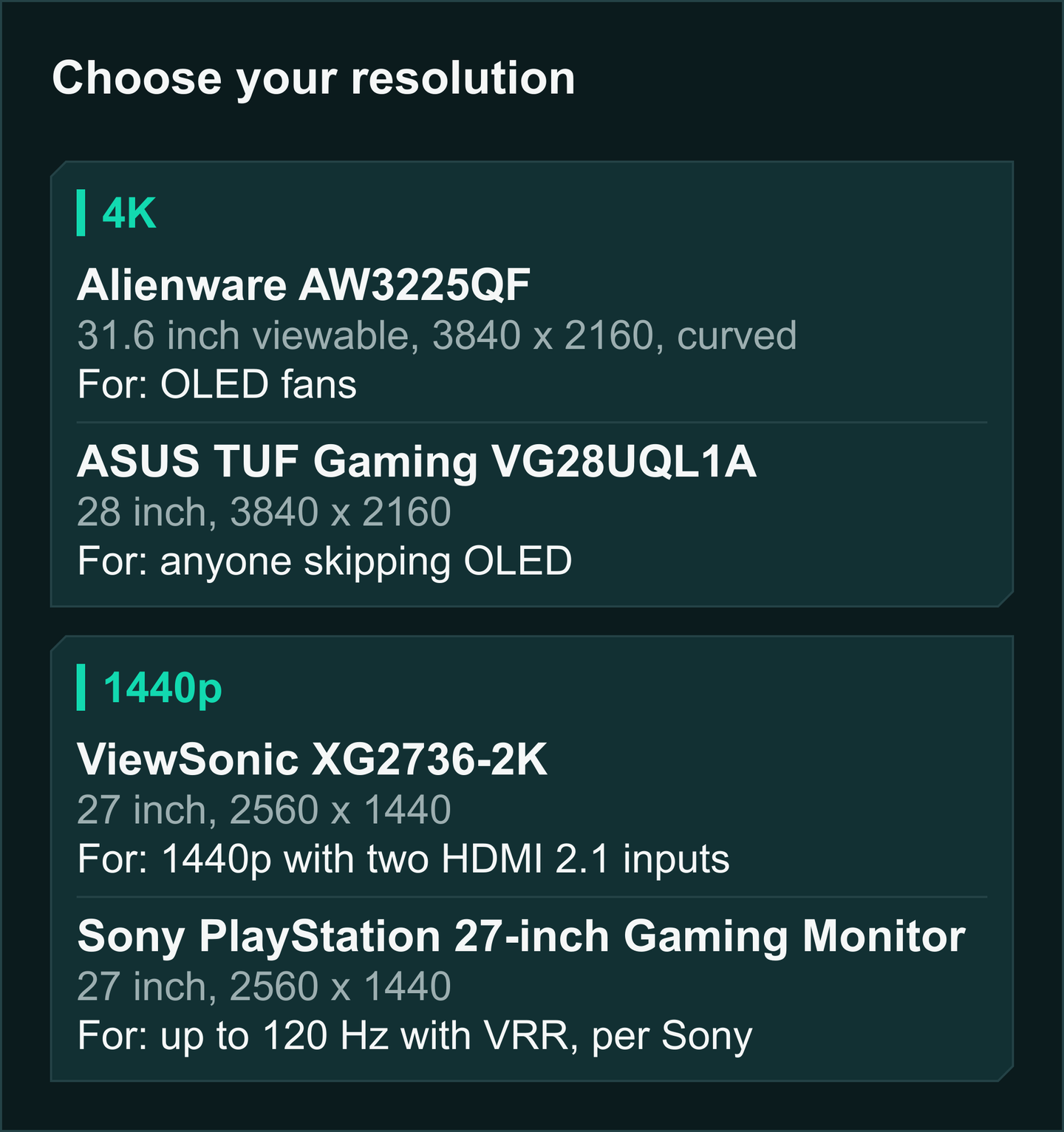
For 4K, the AW3225QF suits OLED fans and the VG28UQL1A suits anyone skipping OLED. For 1440p, the XG2736-2K can be bought today, and the PlayStation monitor joins it once it is back in stock.
Frequently asked questions
What is the best gaming monitor for a PS5?
Our top pick is the Alienware AW3225QF for 4K, since Dell rates both its HDMI 2.1 inputs at 4K 240 Hz with VRR. For 1440p, the ViewSonic XG2736-2K gives 48 to 144 Hz on its two HDMI 2.1 inputs, per ViewSonic.
Do I need a 240 Hz monitor for a PS5?
No. The Sony pages we opened name 4K at 120 Hz and 1440p at 60 or 120 Hz as PS5 outputs, and Sony caps its own 240 Hz monitor at 120 Hz on a PS5.
Does a PS5 monitor need HDMI 2.1?
For 4K at 120 Hz, Sony's checklist says to connect to an HDMI 2.1 port, and for VRR it asks for a VRR-compatible HDMI 2.1 display. Its 1440p note only asks for a display that supports 1440p at 60 Hz, or 60 Hz and 120 Hz.
Does the PS5 support 1440p?
Yes. Sony's support page lets you test 1440p output at 60 and 120 Hz and VRR, and a February 2023 PlayStation Blog post added VRR at 1440p on a VRR-compatible HDMI 2.1 display.
Why is my monitor stuck at 60 Hz on the PS5?
Sony's 120 Hz Output setting only turns on 120 Hz for games that support it, and Sony says to switch it off if a monitor shows video problems. Also check the HDMI row of the spec sheet: ViewSonic gives the XG2736-2K 144 Hz on HDMI 2.1 and 240 Hz on DisplayPort.
Sources
- How to change PS5 console resolution, PlayStation US support, official page (undated, read November 20, 2026)
- Variable Refresh Rate support for PS5 is rolling out this week, PlayStation Blog (April 25, 2022)
- PS5 system software update rolls out globally today, PlayStation Blog (February 2, 2023)
- First look at PlayStation's 27" Gaming Monitor, PlayStation Blog (November 11, 2025)
- 27" Gaming Monitor with DualSense Charging Hook, PlayStation US, official product page (undated, read November 20, 2026)
- 27" Gaming Monitor with DualSense Charging Hook, PlayStation Direct US, store listing (stock status read November 20, 2026)
- Alienware 32 4K QD-OLED Gaming Monitor (AW3225QF), Dell US, official product page (undated, read November 20, 2026)
- TUF Gaming VG28UQL1A specifications, ASUS US, official spec page (undated, read November 20, 2026)
- ViewSonic XG2736-2K, ViewSonic US, official product page (undated, read November 20, 2026)