Quick answer
Pick a 24-inch 1080p monitor if you chase frame rate in Valorant or CS2. Pick a 27-inch 1440p monitor if your graphics card has frames to spare and you want a sharper image.
- Pick 24-inch 1080p if your frame rate in Valorant or CS2 already sits near your target.
- Pick 27-inch 1440p if your GPU holds your target frame rate at 2560 x 1440.
- Pick 24-inch 1080p if you sit close to the screen, since a 27-inch needs about 12.5% more distance for the same angle.
In this article
Part of: Best Gaming Monitors for FPS
On paper the 27-inch 1440p gives you the sharper image, but it costs frame rate in Valorant and CS2. That trade is what this page measures, in fps, pixels, inches and pro usage.
| Measure | 24-inch 1080p | 27-inch 1440p |
|---|---|---|
| Pixels per frame | 2,073,600 | 3,686,400 |
| Pixels per inch | 91.8 | 108.8 |
| Panel width (16:9) | 20.9 in | 23.5 in |
| Tracked pros (ProSettings.net, November 2026) | More than 8 in 10 on a 23 to 25-inch 1080p monitor | A small share |
How many fps does 1440p cost in CS2?
In Notebookcheck's CS2 tests, 1440p cut an RTX 4080's frame rate by 18% and an RX 7900 XT's by 23%, less than the pixel count would suggest: 1080p asks for 44% fewer pixels per frame (2,073,600 against 3,686,400).
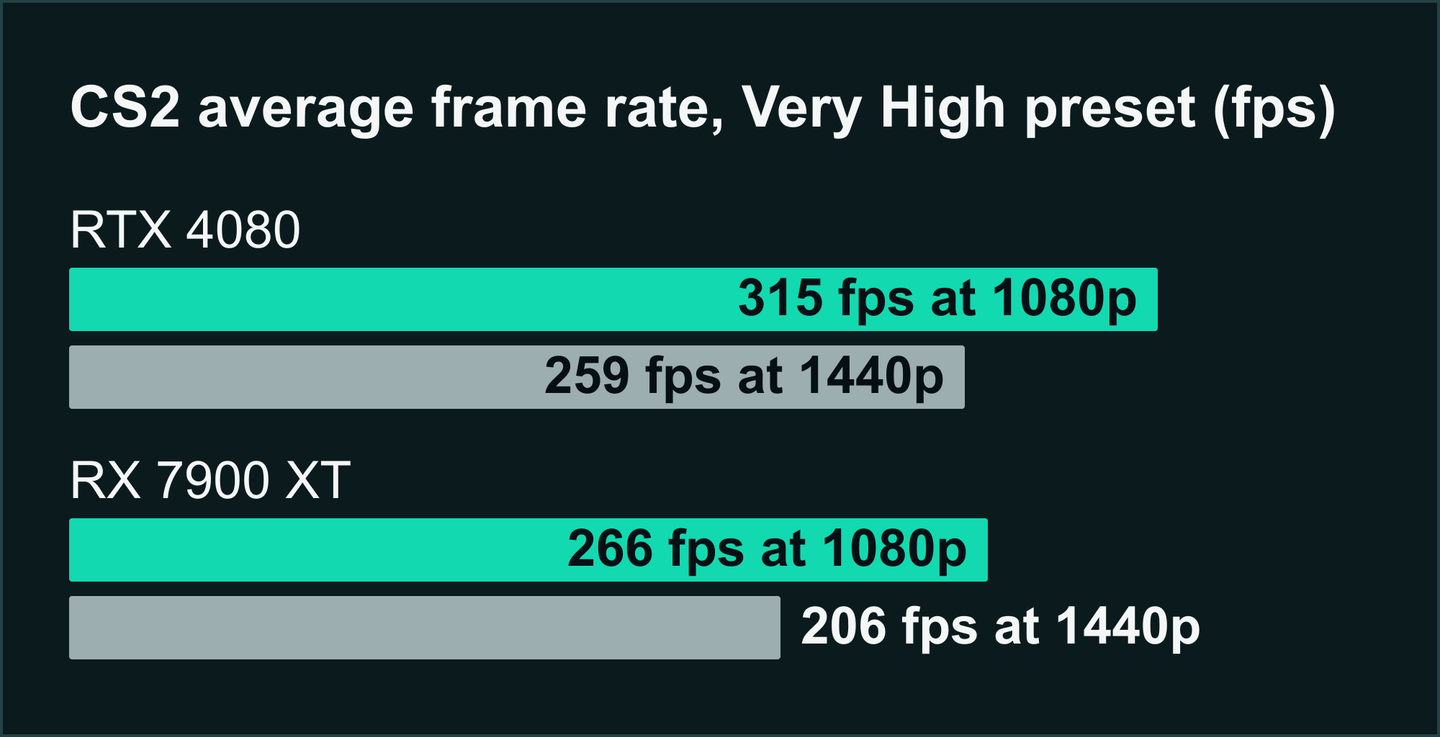
Both cards ran on a Core i9-13900K at the Very High preset: the RTX 4080 went from 315 fps at 1080p to 259 fps at 1440p, the RX 7900 XT from 266 fps to 206 fps. Two cards on one CPU are no promise for yours.
Is 27-inch 1440p sharper than 24-inch 1080p?
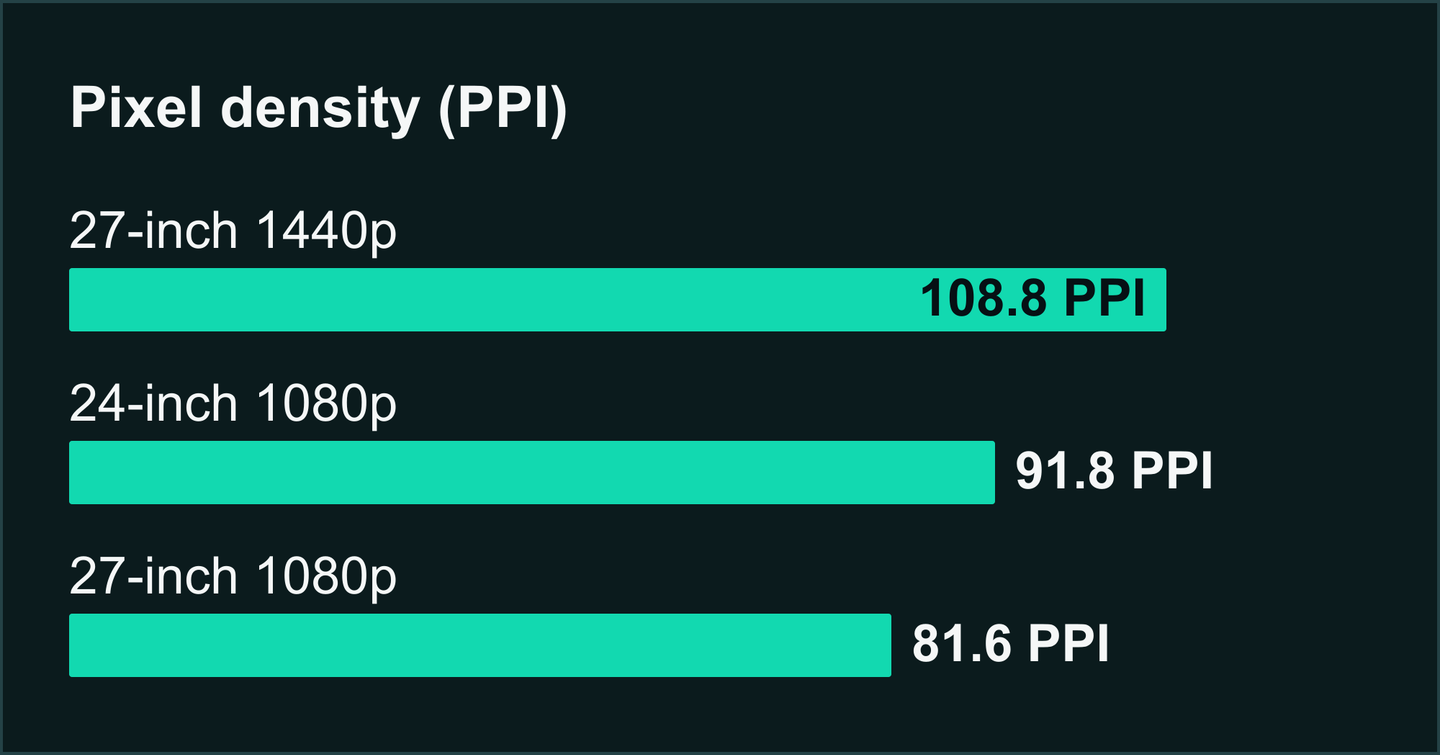
Yes: 108.8 PPI against 91.8 PPI, or 18.5% denser. Pixels per inch (PPI) is the diagonal in pixels divided by the diagonal in inches, and 1080p on a 27-inch panel falls to 81.6 PPI.
Is a 27-inch monitor too big for FPS?
It takes up more of your field of vision. A 27-inch 16:9 panel is 23.5 inches wide against 20.9 for a 24-inch, which means 26.6% more area, and you must sit 12.5% farther back to keep the same angle.
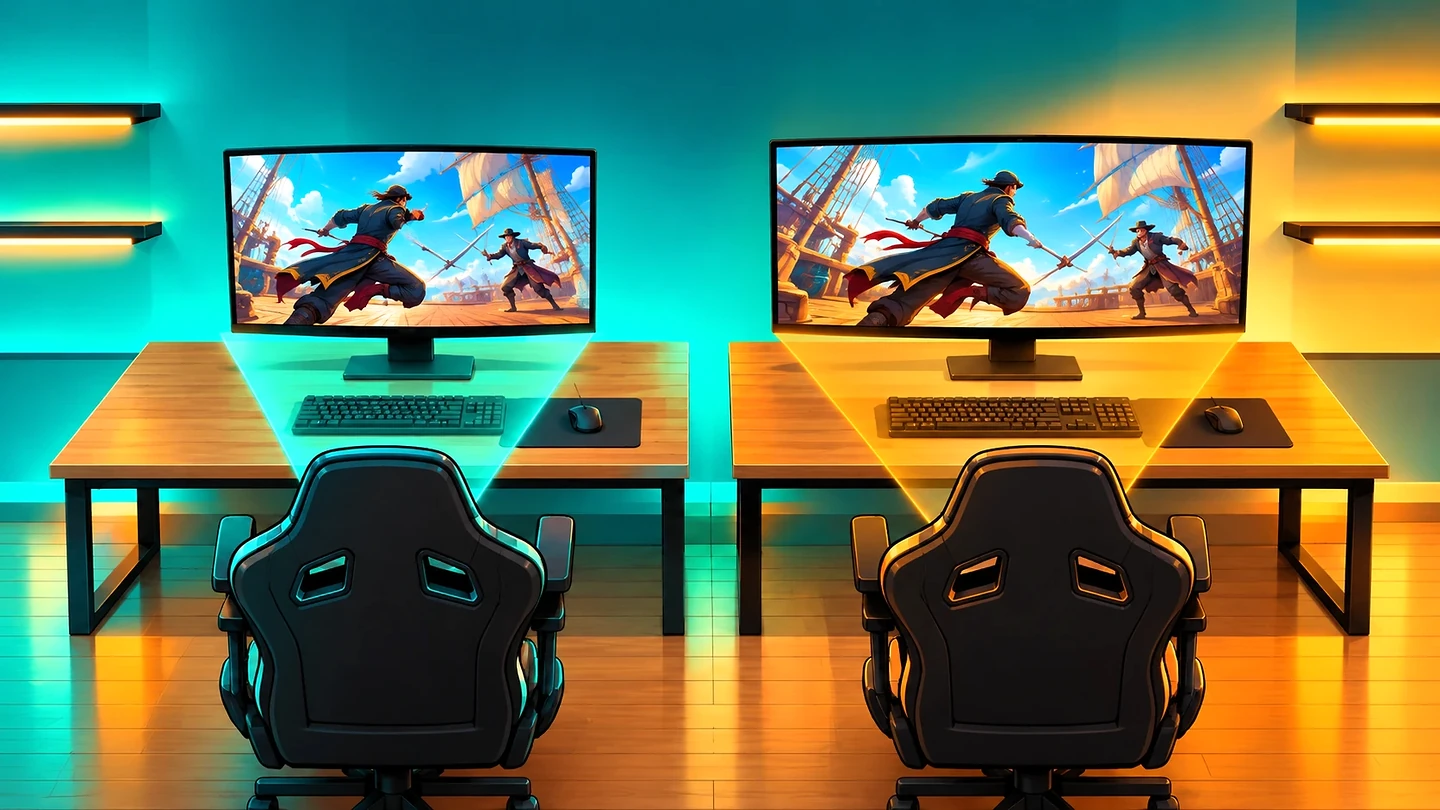
OSHA puts the preferred viewing distance at 20 to 40 inches. At 30 inches, the 24-inch spans about 38 degrees and the 27-inch about 43 (our math). Some 27-inch models offer a smaller mode, for example the 24.5-inch tournament mode of Sony's INZONE M10S II.
What monitor size and resolution do pro players use?
Mostly 1080p on 25 inches or less. More than 8 in 10 of the 2,458 pros on ProSettings.net's monitor list use a 23 to 25-inch monitor and a 1080p resolution. The five most-used models alone, all 24 to 24.5-inch 1080p ZOWIE panels, cover 1,376 of them (56%).
The list counts pros per model, not per size, so the 8 in 10 is our tally of its rows. Pro choices do not always fit every player.
What mistakes should you avoid when choosing 1080p or 1440p?
Check your own CPU, preset and sitting distance before trusting a spec sheet.
- Reading a CPU-bound frame rate as GPU headroom. Notebookcheck's RTX 4080 posted 320, 318 and 315 fps at 1080p across Medium, High and Very High, so the run looks CPU-bound (our reading). Valorant, too, leans on the CPU at competitive settings.
- Assuming the drop holds at your settings. The site tested 1440p only at Very High, so the drop at competitive low settings is unmeasured there.
- Ignoring the 20-inch end of OSHA's range. There our math gives 55 degrees for the 24-inch and 61 for the 27-inch, six more to take in.
Which should you pick, 24-inch 1080p or 27-inch 1440p?
Our take: for ranked Valorant or CS2, stay on 24-inch 1080p until your GPU holds your target frame rate at 1440p with headroom.
Which format fits you?
Choose 24-inch 1080p if…
- An 18 to 23% cut in frame rate, as in that CS2 test, would push you under your target.
- Your desk is shallow and you work close to the screen.
- You want the setup most tracked pros use.
Choose 27-inch 1440p if…
- Your GPU still holds your target frame rate after that cut.
- You also play slower games and want finer detail.
- You have room to move 12.5% farther back, inside OSHA's 20 to 40 inches.
Six models of both sizes, compared on specs and pro usage, are in our FPS monitor shortlist.
Frequently asked questions
Is 1440p worth it for CS2?
Notebookcheck's CS2 tests from November 2023 (Very High preset, Core i9-13900K) took an RTX 4080 from 315 fps at 1080p to 259 at 1440p, and an RX 7900 XT from 266 to 206. If your GPU keeps your target frame rate after a cut like that, 1440p is worth trying.
Why do most pros use 24-inch monitors?
More than 8 in 10 of the pros tracked by ProSettings.net use a 23 to 25-inch monitor and a 1080p resolution (ProSettings.net, November 2026), but the page does not say why. A 24-inch panel is 20.9 inches wide against 23.5 for a 27-inch, so it takes up less of your field of vision.
Does 1080p look bad on a 27-inch monitor?
Its density falls to 81.6 pixels per inch, against 91.8 for a 24-inch 1080p and 108.8 for a 27-inch 1440p.
What resolution do CS2 pros play at?
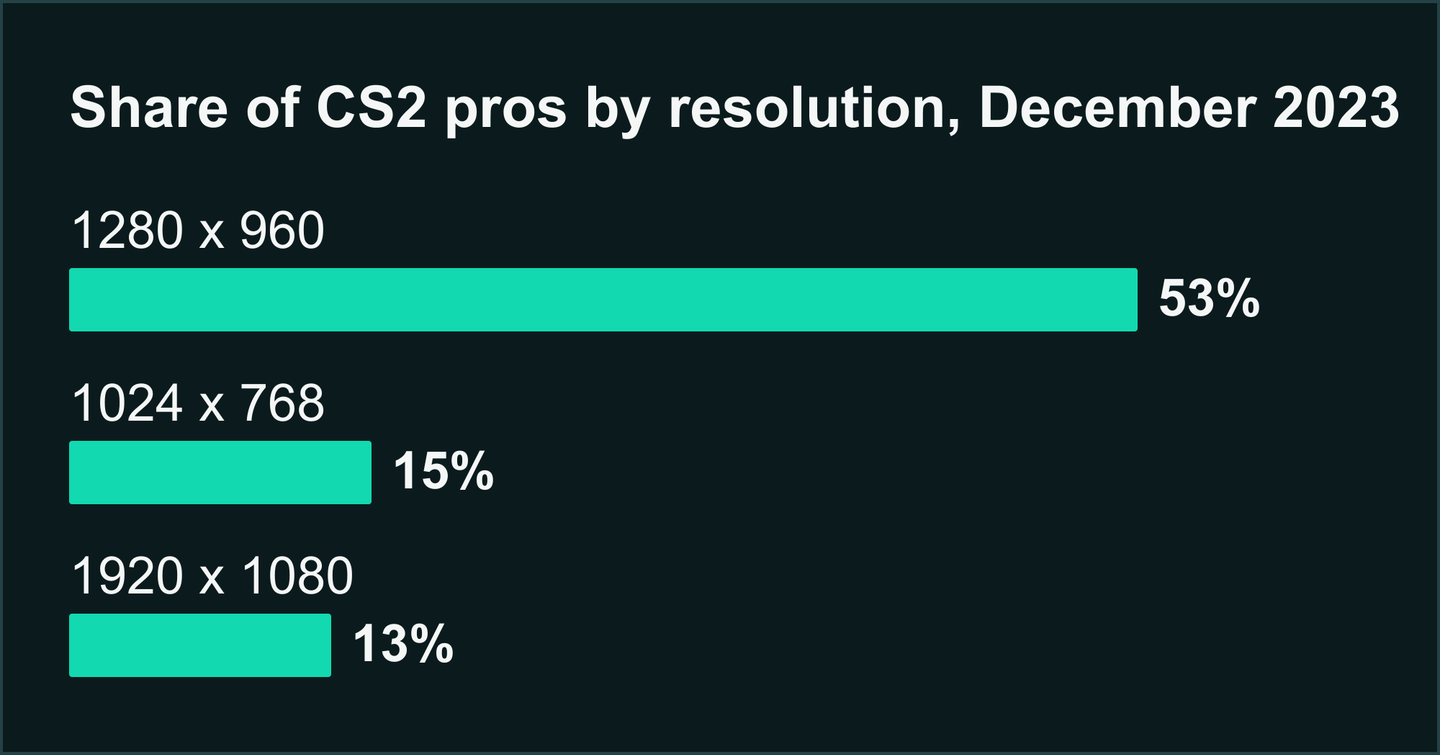
In ProSettings.net's December 2023 data, 53% of CS2 pros played 1280 x 960, 15% played 1024 x 768 and 13% played 1920 x 1080. 1440p was not in its top five.
Sources
- Monitors used by pro players, ProSettings.net, pro usage list (undated, read November 20, 2026)
- Best CS2 Resolutions, ProSettings.net, pro resolution data (December 18, 2023)
- Best CS2 Settings in 2026, SteamDB, settings guide (published July 2, 2026, updated November 14, 2026)
- Counter-Strike 2 in review: laptop and desktop benchmarks, Notebookcheck, benchmark review (published November 11, 2023, updated October 5, 2026)
- Best GPU for VALORANT, ProSettings.net, guide (last modified May 27, 2026)
- Computer Workstations: Monitors, OSHA, official guidance (undated, read November 20, 2026)
- Sony Electronics Expands Gaming Gear Lineup with INZONE H6 Air and INZONE M10S II, Sony Electronics, official press release (April 14, 2026)